More Coming as we learn them.
More Coming as we learn them. |
|
Key(s) or Misc
If more than one key, press & hold the first, then press the next key. |
Where/When | Result/Comments |
| Reader View | Firefox browser, perhaps others | Click here for details. |
| Win Logo +P |
Add a second monitor (shortcut) |
Press the Windows logo key +P on your keyboard.
Select Extend from a few choices. |
| mobile#@txt.att.net mobile#@messaging.sprintpcs.com mobile#@tmomail.net mobile#@vtext.com |
Email to text |
Use email to send text messages or SMS to a cell phone. thegeekstuff.com has details and many other carriers listed. |
| Shift + Enter | Web editors (Wordpress, Drupal, Dreamweaver, etc) | Enter normally does a new paragraph which may appear as double or even triple spacing. |
| F11 | Some web browsers | Browser window expands to full-screen mode so more of a web page can be seen. Undo by pressing F11 key again. |
| Ctrl + Enter | Some web browsers | When a web address or URL ends in .com, type the domain name and then press Ctrl & Enter. Saves lots of typing. Example: type domainname followed by pressing Ctrl & Enter, instead of typing http://www. domainname.com . |
| Ctrl + the key with ~ (tilde) | Excel | If your spreadsheet has equations in it, this shows where they are and what they are. Can be printed for reference. Undo by pressing Ctrl tilde again. |
| B or W | Power Point | Fades the screen to Black or White. Useful when a presentation digresses temporarily or if only part of a presentation needs slides; also works for timed slides. Undo by pressing the B or W again. |
| Windows key + Up Arrow | Windows | Maximizes a window. Undo with Windows key and Down Arrow. |
|
Windows logo keys |
Windows |
Results are quick access to Explorer, Run dialog box, Find files, or system properties dialog box. |
| Right click highlighted
files and/or folders, then select
send to/mail recipient. **Click here to see picture below. |
Windows |
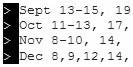
**File names to text. |
|
Alt (or Alt + Shift) |
Word |
Changes a vertical
block of text. Place cursor to upper left of area to be changed. Press
and hold Alt key (& Shift key if needed). Then move cursor along desired
block. Release the Alt key and do a deletion, uppercase letters (shift+F3 key), bold,
highlight, etc. This is most useful when parts of many rows need to be
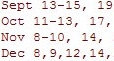
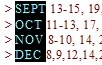
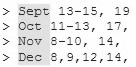
changed. Examples: |
|
Ctrl + Backspace |
Word |
Deletes the word to
the left of the cursor. |
| Highlight, then press Ctrl & drag mouse | Most Applications | Copies highlighted text to new location; within a document, or between two windows, or from a web site into the Google search box, etc. |
| Clean up html code | Dreamweaver | Use the Clean Up HTML or Word HTML command to automatically remove empty tags, combine nested font tags, and generally improve messy or unreadable HTML code. |
| Helpful websites | Changing to Mac from Windows | Switch 101: On Windows, I used to... Apple support Ultimate Switcher Guide: Windows PC to Mac My First Mac |
Copyright 1999-2020, starr.net, Last update 1-2020.
About KeyBoard Help. Click here to Contact
me. (Remember to change
dotspam
to .net
in the To:
line.)
 Windows logo keys (near Alt keys)
+ D key
Windows logo keys (near Alt keys)
+ D key